

The four documentation types
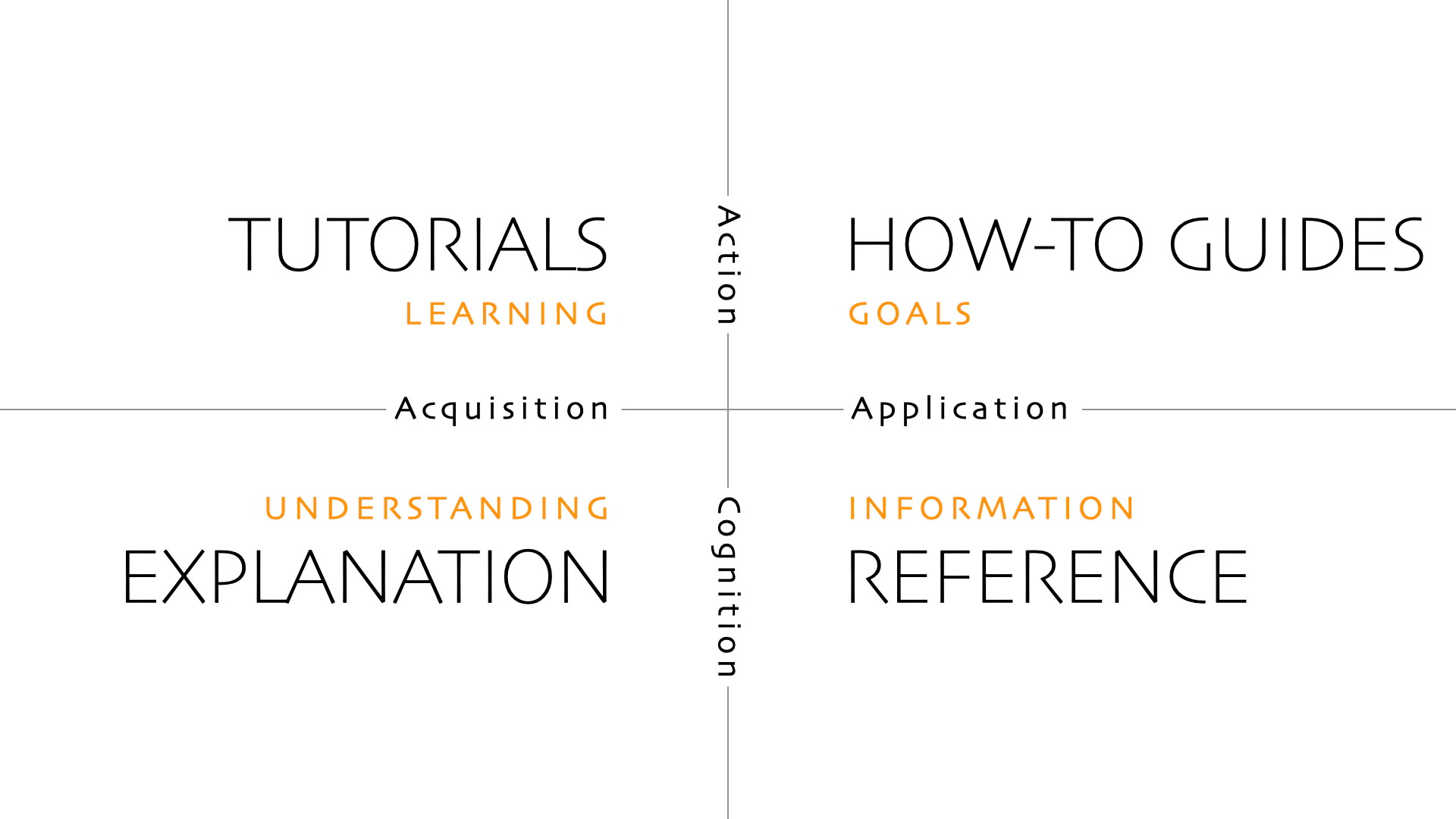
Tutorials (learning-oriented)
Tutorials teach through doing. The user’s goal is to learn something new, and the tutorial’s goal is to give them a successful experience—not to document every option or explain every detail. A good tutorial:- Assumes no prior knowledge of the specific task
- Takes the user through one complete, working example from start to finish
- Minimizes choices—tell users exactly what to do rather than offering alternatives
- Marks progress at meaningful milestones (“You’ve now configured authentication”)
- Explains just enough to keep the user moving, not everything there is to know
How-to guides (task-oriented)
How-to guides help users accomplish a specific goal. Unlike tutorials, they assume the user already has some context and wants to do a particular thing, not learn a concept. A good how-to guide:- Addresses one specific task in the title and throughout
- Assumes prior knowledge of the prerequisites
- Provides a clear sequence of steps without unnecessary context
- Describes what to do, not how the system works underneath
Reference (information-oriented)
Reference documentation describes the system accurately and completely. Users consult it to look something up—they aren’t reading sequentially, and they aren’t learning. Good reference documentation:- Prioritizes completeness and accuracy above all else
- Is scannable: tables, consistent formatting, short descriptions
- Avoids explanatory or conceptual content
- Documents everything, including defaults, limits, and edge cases
- Stays close to the structure of the thing being documented (an API reference follows the API’s structure)
Explanation (understanding-oriented)
Explanations deepen understanding of a concept. Users read them when they want to understand why something works the way it does, not how to do a specific task. Good explanation content:- Addresses the context and motivation behind a design decision
- Acknowledges tradeoffs and alternatives
- Connects concepts across the broader system
- Is comfortable being opinionated where appropriate
Choose the right type for each page
| Question | Tutorial | How-to | Reference | Explanation |
|---|---|---|---|---|
| What is the user’s goal? | Learn through practice | Solve a specific problem | Find precise information | Understand a concept |
| What level of knowledge does the user have? | Beginner | Intermediate | Experienced | Any |
| Is the content task-oriented? | Yes, guided | Yes, specific | No | No |
| Is it sequential? | Yes | Usually | No | No |
Writing for each type
Writing tutorials
Set expectations at the start: what will users have built or accomplished by the end? Use<Steps> components for sequential progress and celebrate completion at natural milestones. Minimize decisions—where there are multiple valid approaches, pick one and say so.
Writing how-to guides
Lead with the task in the title: “How to configure webhooks,” “How to migrate from v1 to v2.” Write from the user’s perspective, not the product’s. Skip context that doesn’t affect the steps. Link to explanation or reference content for users who want to understand more.Writing reference
Structure reference docs around the thing being described, not around user journeys. Use consistent formatting across all entries. Every parameter, flag, or option should have a type, default value, and one-line description. Keep it scannable.Writing explanation
Start with the question you’re answering: “Why does authentication work this way?” or “What’s the difference between organizations and workspaces?” Acknowledge that multiple approaches exist and explain why the product makes the choices it does. Link to how-to guides for users who want to act on what they’ve learned.Tips for maintaining type consistency
- Assign a content type before writing. Deciding in advance shapes every other writing decision—structure, length, tone, what to include and exclude.
- Review mixed-purpose pages. Pages that explain a concept and include a tutorial and reference a list of options all at once are hard to maintain and hard to use. Split them or pick a primary type.
- Adapt the framework to your product. Diátaxis is a starting point, not a rigid rule. Products with unusual structures may need hybrid approaches. The underlying principle—match content to the user’s need in the moment—applies universally.
Frequently asked questions
Do I need all four content types for every feature?
Do I need all four content types for every feature?
No. Small features may only need a how-to guide and a reference entry. The types describe needs users might have, not a checklist you must complete. Start with what your users actually need—usually a how-to guide and reference—and add tutorials and explanations where users are consistently struggling to get started or understand something.
What's the difference between a tutorial and a how-to guide?
What's the difference between a tutorial and a how-to guide?
Tutorials are learning experiences. The user starts without knowledge and ends having built or completed something, with the tutorial doing most of the pedagogical work. How-to guides are task references. The user knows what they want to do and needs the steps to do it. A tutorial on “Build your first integration” and a how-to guide on “Connect a new integration” can cover similar actions but serve entirely different users in entirely different contexts.
Can a single page serve multiple content types?
Can a single page serve multiple content types?
In practice, pages often mix types—especially getting started content that blends tutorial and how-to. The question is whether the mixing serves users or confuses them. If a page needs to both teach a concept (explanation) and walk through setup (tutorial), a clear section structure can work. If the content is too mixed to organize cleanly, splitting into separate pages usually produces better results.
How detailed should reference documentation be?
How detailed should reference documentation be?
Comprehensive enough that users don’t need to read source code or contact support to understand a parameter or option. Every configurable value should have a description, type, default, and example. Reference documentation that omits edge cases or limits forces users to discover those limits through trial and error—that’s a documentation failure, not a user error.
Related pages
Content templates
Copy and modify templates for each content type.
Style and tone
Write effective documentation with consistent style.
Understand your audience
Research and define your documentation audience.
Navigation
Organize your documentation structure effectively.
Improve your docs
Use data and metrics to improve documentation.